|
Set the Wavelength Range
Set the spectrophotometer to scan the desired wavelengths (usually 400 to 700 nm to scan the visible region of the spectrum). These parameters must be the same wavelength range that will be
used for the sample.
Set the Step Size
If the step size is not set for you, you will have to set the step size. The step size indicates how often the spectrophotometer will record an absorbance measurement. A step size of one nanometer is common. A step size of one nanometer indicates that the spectrophotometer will collect absorbance data for every nanometer within the wavelength range.
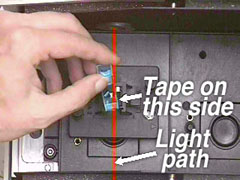
IMAGE. When the cuvet containing the reference sample is placed into
thecompartment, its clear sides should be perpendicular to the light source.
|
Place the Cuvet in the Cell Compartment
Place the cuvet containing the reference liquid into the cell compartment in the spectrophotometer. Note the position of the mark on the cuvet in your notebook to make sure that the cuvet is placed in the sample holder the same direction each time. Remember that the light must pass through the sample, so make sure the clear sides of the cuvet are perpendicular to the path of the light.
Zero the Spectrophotometer
With the sample compartment lid closed, zero the spectrophotometer. Specific directions
for zeroing the spectrophotometer available to you should be provided by your instructor.
|


