
Frequently Asked Questions (FAQ)
What is the fastest way to get to a movie?
Can I see larger versions of the pictures?
Why do index entries point to the same movie multiple times?
I have found a movie (or image) I would like my students to look at. How can they get at it quickly?
What if I see a "broken icon" instead of the movie or molecular animation I was expecting?
What is the folder/directory structure on the CDROM? I would like to locate movie files and other resources.
When I click an entry in the table of contents, why do I sometimes get another entry in the table of contents with the same name?
The table of contents includes an overview TOC and a detailed TOC. The reason for having the overview is to make apparent the overall structure of the material. The reason for having the detailed TOC is to help you get to a desired topic or movie. The overall TOC and detailed TOC are on the same page, and the overall TOC items are linked to corresponding detailed TOC items. Thus at first you might find yourself taking an additional step to get to a topic. To avoid this extra step you can scroll down to the detailed TOC.
What is the fastest way to get to a movie?
In the table of contents, if you click on a small movie icon which looks like

you will be taken directly to the movie page, bypassing the topic information.
If instead you click on the text for an entry, you will be taken to a topic. You can then view any of the information provided on the topic such as text, other movies, stills and animations (including the primary movie).
Can I see larger versions of the pictures?
Besides containing text and movie links, the "topics" pages also contain still images/pictures. Examples of these pictures include the first, last and key frames of every movie, as well as related charts and exhibits. Each picture is linked to a larger version of the picture. You might want to use the larger version to display to a class, or simply to get a better look at the image. Note also that the page containing the larger picture indicates the location of the data file containing the picture, and that the page can be bookmarked in your browser.
Why do index entries point to the same movie multiple times?
Occasionally the same movie is used to make different points and thus occurs in several places in the topics. The text and related images might be different in each place.
The index points to the topic, not directly to the movie.
This will also be the case when a movie occurs on multiple CDROMs in the Chemistry Comes Alive! series. A consolidated index is planned which will point to all occurrences.
The above comments also apply to the textbook cross-reference.
I have found a movie (or image) I would like my students to look at. How can they get at it quickly?
Clicking on a movie icon within a topic will take you to a page that plays the movie (or shows the still). If you place a Bookmark in the browser for that page, others can go directly to that page. Page titles are (hopefully) meaningful.
By means of a list of bookmarks, one can provide a sort of lesson plan or list of items to be browsed.
What if I see a "broken icon" instead of the movie or molecular animation I was expecting?
This is usually the result of not having the proper plugin installed in your browser. Installation instructions are provided in the ReadMe.wri (Windows) or Read Me First! (Macintosh) file and here. Links to required plug-ins are also on the download page.
"The little rows of dots in the background make the font very difficult to
read because they change the shapes of the letters inconsistently. I kept
trying to adjust my glasses. What's wrong here?" (Windows 95)
Perhaps you have selected "large fonts" in Windows 95. The program was tested with "small fonts". In the Start Menu-->Settings-->Control panel-->Display-->Settings tab, specify "Font size" to be "small fonts"
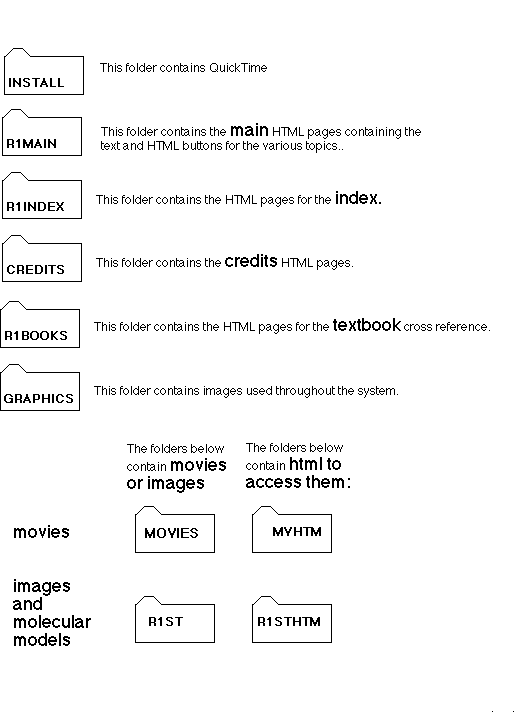
What is the folder/directory structure on the CDROM? I would like to locate movie files and other resources.
The page that plays a movie provides the name and location of the movie. The same thing applies to still images.
Here is the overall folder/directory structure of the CDROM.
© 1997 Division of Chemical Education, Inc., American Chemical Society. All rights reserved.